The order that looked real
A while back, AXD got an email asking for a quote on a large batch of laptops for a school district in Virginia. It had everything a real request has: a staff member's real name, a proper signature block, the school's real street address, and a polite, specific list of what they needed.
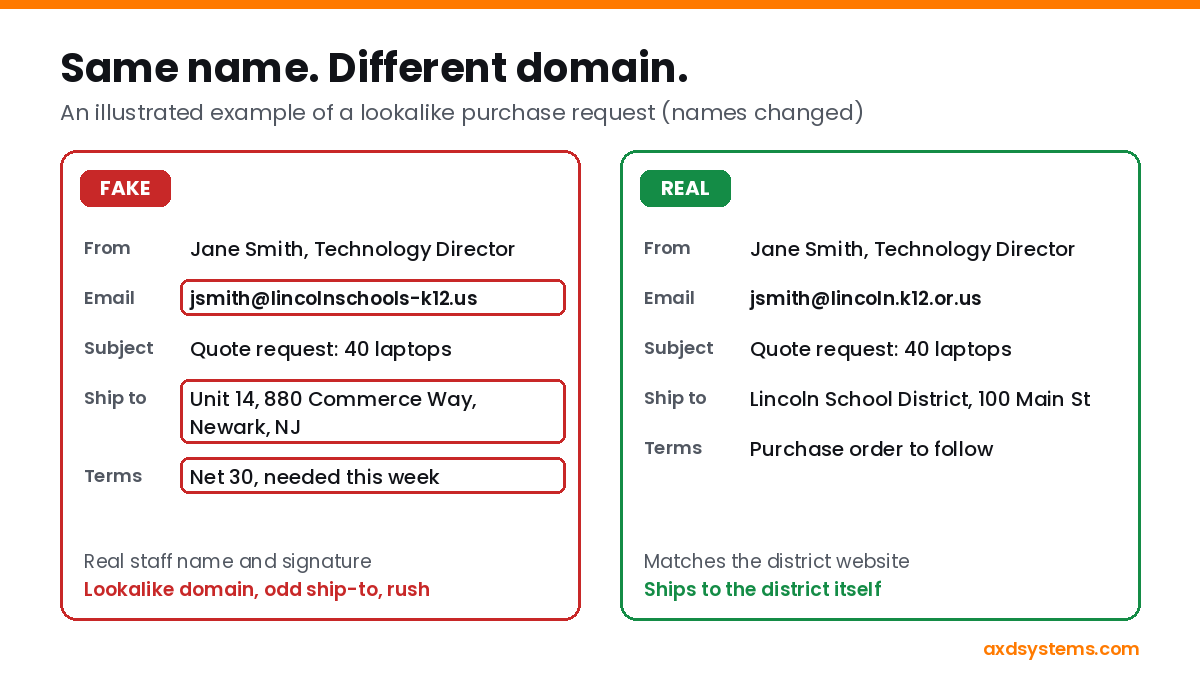
It was fake. The sender's domain looked like the district's, but it wasn't. Whoever sent it had registered a lookalike domain in the real staff member's name, using the school's own address, so even a quick lookup made it seem legitimate. A call to the real district confirmed they'd never sent it.
Scams like this target small businesses that sell or resell equipment, but the same trick shows up as fake invoices, "updated bank details" from a vendor, and urgent gift card requests from "the boss." The checks are the same. And it's not just faraway schools: local governments, schools, and nonprofits here in Coos County buy equipment too, which makes them easy names to borrow.
Five checks before you quote, ship, or pay
- Read the actual email address, not the name. The display name can say anything. Look at what comes after the @ and compare it, letter by letter, to the organization's real website. Schools, cities, and agencies often use a specific domain (like k12.or.us or .gov). A shorter or slightly different domain is a red flag.
- Look up who owns the domain, and when it was made. A domain registered last week sending a large order is suspicious, even if the owner's name and address look right. Scammers copy real names and addresses into registration records.
- Check where it ships. A school order that ships to a storage unit, a freight forwarder, or a home address in another state is the classic tell. Real organizations ship to themselves.
- Call a number you found yourself. Never use the phone number in the email. Look up the organization's main line on its real website and ask for the person by name. This one step stops almost every one of these scams.
- Slow down when they push. Net-30 terms on a first order, a rush deadline, or "please keep this confidential" are pressure tactics. A legitimate buyer will wait a day while you verify.
Already sent a quote, shipped, or paid?
Act fast. Call your bank right away to try to stop or reverse the payment, and contact your shipping carrier to try to redirect any package still in transit. Report it to the FBI at ic3.gov, and keep the original emails, since you'll need them for the bank, the report, and your insurance.
Protect your own name, too
The flip side is that scammers can pretend to be your business. Three email settings, called SPF, DKIM, and DMARC, tell other mail servers which emails really come from your domain and what to do with fakes. With DMARC set to quarantine or reject, an email forged from your domain is far more likely to land in spam or be blocked instead of reaching your customers' inboxes.
Many small businesses on the South Coast have never set these up, often because nobody told them they existed. It's usually a short, one-time job.
Check your domain for free
Run our free Tech Checkup to see whether your SPF, DKIM, and DMARC are in place, or read how we handle Microsoft 365 email security for Coos Bay and North Bend businesses. If something looks off, book a free 30-minute call and we'll walk through it together.